
Table of Contents
- Introduction
- Features you’ll see
- Pipeline overview
- Code Walkthrough: Pipeline Header + Shared SSH Settings + Parameters (Line#1–33)
- Code Walkthrough: SSH Trust Bootstrap (Prepare known_hosts) (Line 35–51)
- Code Walkthrough: SSH Health Check (Line 53–60)
- Code Walkthrough: Prepare Healthcheck Playbook (Line 62–101)
- Code Walkthrough: Ansible Healthcheck (Line 103–115)
- Code Walkthrough: Archive Result + Notifications (Line 117–167)
- Jenkins file
- Summary
Introduction
If you’re curious about network automation but don’t yet have a clear picture of what it can actually do, a good starting point is to automate something small, safe, and repeatable.
Instead of jumping straight into configuring routers/switches, we’ll begin with a system healthcheck on an Ansible runner (a Linux host). The goal is to prove the end-to-end flow:
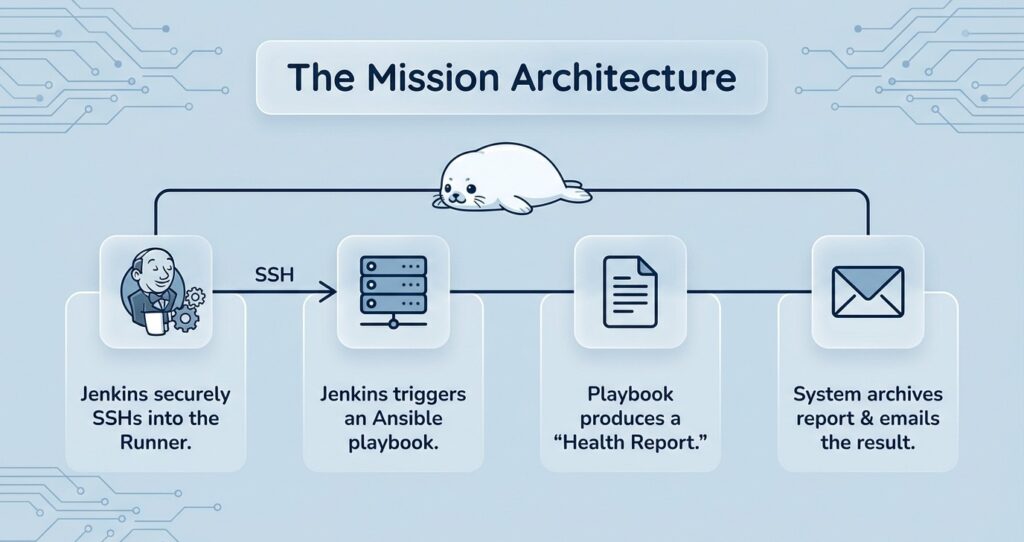
- Jenkins can securely SSH into an Ansible runner
- Jenkins can trigger an Ansible playbook
- The playbook produces a clean “healthcheck report” (stdout)
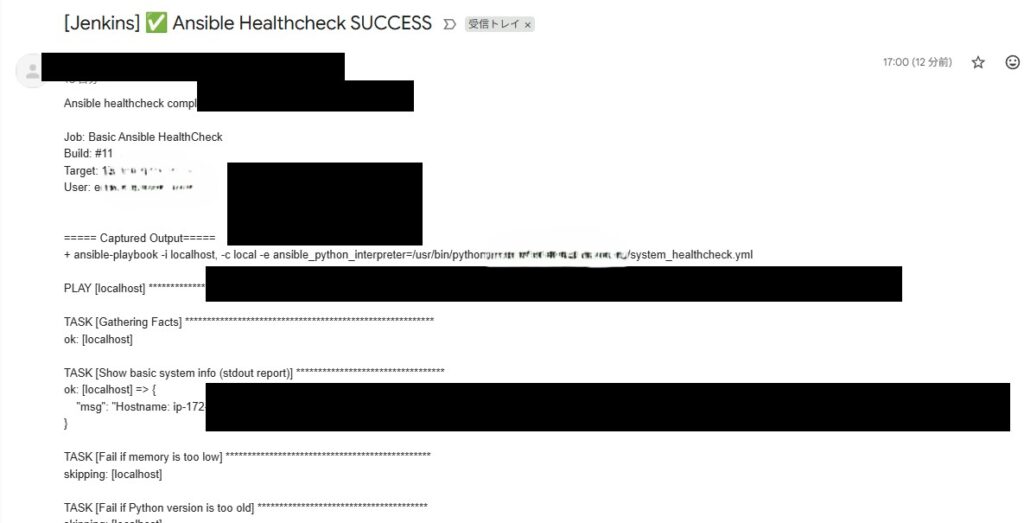
- Jenkins archives the report and sends it by email
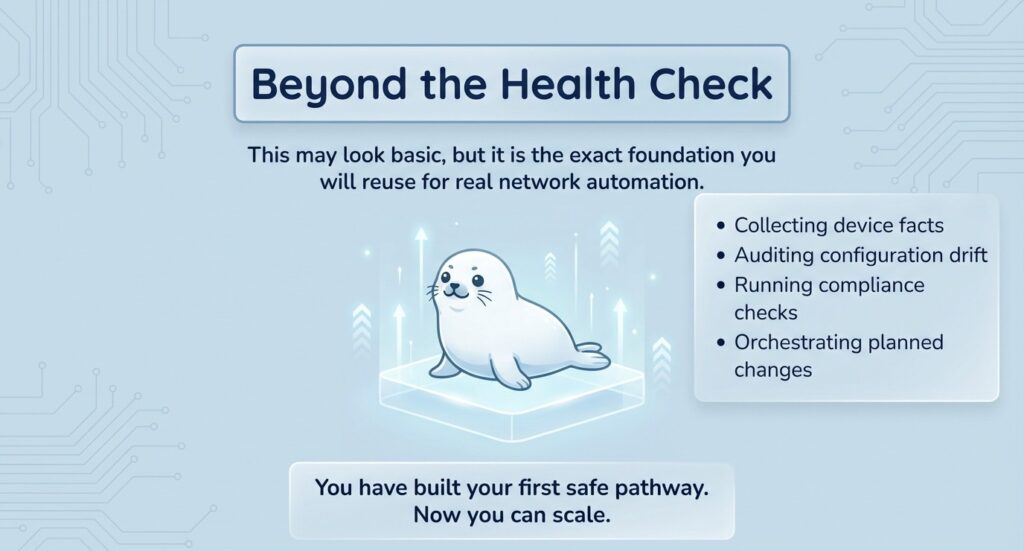
This may look “too basic” at first—but it’s exactly the foundation you’ll reuse later for real network automation tasks such as collecting device facts, auditing configuration drift, running compliance checks, or orchestrating planned changes.
Features you’ll see
- Jenkins parameters: Use
TARGET_IP,ANSIBLE_USER,NOTIFY_EMAILto reuse the same Jenkinsfile across environments—change inputs, not code. - Jenkins stages: Each concern is split into a stage: establish SSH trust → verify connectivity/tools → generate the playbook → run the healthcheck → archive results.
- Ansible playbook: Collect facts, print a system summary, and fail fast on basic thresholds (e.g., low memory / old Python).
- Artifacts + email: Capture stdout to
system_info.txt, archive it as an artifact, and include the same report in the email.
Pipeline overview
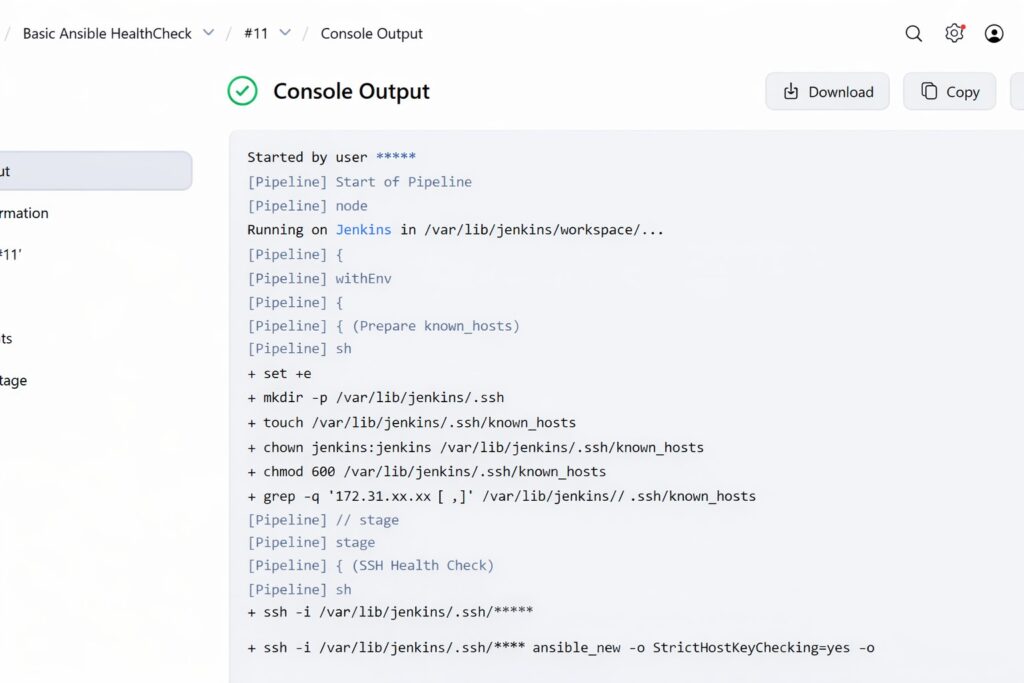
Prepare known_hosts – create/lock down known_hosts, add the Ansible host key to prevent interactive prompts.
SSH preflight – try SSH into the Ansible and confirm Ansible + Python are available.
Create playbook – generate a minimal healthcheck playbook on the Ansible runner.
Run + capture output – execute ansible-playbook and save the output to system_info.txt.
Archive + notify – archive system_info.txt as a Jenkins artifact and email the captured report.
Code Walkthrough: Pipeline Header + Shared SSH Settings + Parameters (Line#1–33)
pipeline {
  agent any
  environment {
    // SSH private key path on Jenkins agent
    SSH_KEY = '=====PLEASE UPDATE TO YOUR SSH PRIVATE KEY PATH VALUE====='
    // known_hosts path on Jenkins agent
    SSH_KNOWN_HOSTS = '=====PLEASE UPDATE TO YOUR KNOWN_HOSTS PATH VALUE====='
    // Enforce host key checking (recommended)
    SSH_OPTS = "-o StrictHostKeyChecking=yes -o UserKnownHostsFile=${SSH_KNOWN_HOSTS}"
  }
  parameters {
    string(
      name: 'TARGET_IP',
      defaultValue: '=====PLEASE UPDATE TO YOUR ANSIBLE RUNNER PRIVATE IP VALUE=====',
      description: 'Ansible runner private IP (e.g. 10.x / 172.31.x inside your VPC)'
    )
    string(
      name: 'ANSIBLE_USER',
      defaultValue: '=====PLEASE UPDATE TO YOUR SSH USER VALUE=====',
      description: 'SSH username on the Ansible runner (e.g. ec2-user, ubuntu)'
    )
    string(
      name: 'NOTIFY_EMAIL',
      defaultValue: '=====PLEASE UPDATE TO YOUR NOTIFICATION EMAIL VALUE=====',
      description: 'Healthcheck notification email'
    )
  }
pipeline { agent any }
pipeline { agent any }This is a Declarative Pipeline. agent any means the job can run on any available Jenkins agent.
environment (Line 3–11)
SSH_KEY: The SSH private key path on the Jenkins agent. Jenkins uses it to SSH into the Ansible runner.SSH_KNOWN_HOSTS: Theknown_hostsfile path on the Jenkins agent. This stores and verifies the target host key.SSH_OPTS: Enforces safer SSH behavior:StrictHostKeyChecking=yes: fail if the host key is unknown/changed (prevents accidentally trusting the wrong host).UserKnownHostsFile=...: forces SSH to use your managedknown_hostsfile.
parameters (Line 12–33)
These are the “things you’ll change per environment” exposed as Jenkins inputs—so you reuse the same Jenkinsfile by changing values, not code:
TARGET_IP: Private IP of the Ansible runner (inside your VPC).ANSIBLE_USER: SSH username (e.g.,ec2-user,ubuntu).NOTIFY_EMAIL: Email address that receives the healthcheck report.
Code Walkthrough: SSH Trust Bootstrap (Prepare known_hosts) (Line 35–51)
  stages {
    stage('Prepare known_hosts') {
      steps {
        sh '''
          set -e
          mkdir -p /var/lib/jenkins/.ssh
          touch "$SSH_KNOWN_HOSTS" || true
          chown jenkins:jenkins "$SSH_KNOWN_HOSTS" || true
          chmod 600 "$SSH_KNOWN_HOSTS" || true
          grep -qE "^${TARGET_IP}[ ,]" "$SSH_KNOWN_HOSTS" 2>/dev/null || {
            ssh-keyscan -H "${TARGET_IP}" >> "$SSH_KNOWN_HOSTS"
          }
        '''
      }
    }
stage('Prepare known_hosts') (Line 35–51)
This stage bootstraps SSH trust so the rest of the pipeline can run non-interactively with StrictHostKeyChecking=yes:
If the target host key isn’t already recorded, it adds it via ssh-keyscan (so SSH won’t prompt later).
Creates the Jenkins ~/.ssh folder (if missing).
Ensures the known_hosts file exists with safe permissions (600).
Code Walkthrough: SSH Health Check (Line 53–60)
    stage('SSH Health Check') {
      steps {
        sh """
          ssh -i "$SSH_KEY" $SSH_OPTS "${params.ANSIBLE_USER}@${params.TARGET_IP}" \
            'whoami && hostname && ansible-playbook --version && python3 --version'
        """
      }
    }
SSH Health Check (Line 53–60)
This stage does a quick “can we actually run?” sanity check by SSH’ing into the Ansible runner and printing:
whoami/hostname: confirms you logged in as the expected user on the expected hostansible-playbook --version: confirms Ansible is installed and reachablepython3 --version: confirms Python 3 is available (needed for Ansible facts/tasks)
If this stage fails, the rest of the pipeline is skipped—so you catch SSH/key/user/tooling issues early.
Code Walkthrough: Prepare Healthcheck Playbook (Line 62–101)
    stage('Prepare Healthcheck Playbook') {
      steps {
        sh """
          ssh -i "$SSH_KEY" $SSH_OPTS "${params.ANSIBLE_USER}@${params.TARGET_IP}" '
            set -eux
            mkdir -p ~/playbooks
            cat > ~/playbooks/system_healthcheck.yml <<'"'"'EOF'"'"'
- hosts: localhost
  connection: local
  gather_facts: true
  tasks:
    - name: Show basic system info (stdout report)
      debug:
        msg: |
          Hostname: {{ ansible_facts.hostname }}
          OS: {{ ansible_facts.distribution }} {{ ansible_facts.distribution_version }}
          Kernel: {{ ansible_facts.kernel }}
          CPU (vCPU): {{ ansible_facts.processor_vcpus | default(ansible_facts.processor_cores, true) }}
          Memory (MB): {{ ansible_facts.memtotal_mb }}
          Primary IP: {{ ansible_facts.default_ipv4.address | default("n/a") }}
          Python: {{ ansible_facts.python.version.major }}.{{ ansible_facts.python.version.minor }}.{{ ansible_facts.python.version.micro }}
    - name: Fail if memory is too low
      fail:
        msg: "Memory too low: {{ ansible_facts.memtotal_mb }} MB"
      when: ansible_facts.memtotal_mb < 800
    - name: Fail if Python version is too old
      fail:
        msg: "Python version too old: {{ ansible_facts.python.version.full }}"
      when: ansible_facts.python.version.major < 3
EOF
            chmod 644 ~/playbooks/system_healthcheck.yml
          '
        """
      }
    }
Prepare Healthcheck Playbook (Line 62–101)
This stage SSHes into the Ansible runner and writes a minimal Ansible playbook (~/playbooks/system_healthcheck.yml) that the next stage will execute.
- Creates a working folder on the runner:
~/playbooks - Generates the playbook using a heredoc (
cat > ... << 'EOF' ... EOF) - Sets safe file permissions:
chmod 644
Inside the playbook:
gather_facts: truecollects system facts (OS, kernel, CPU, memory, IP, Python version, etc.).- Debug output prints a readable system summary to stdout (so Jenkins can capture it).
- Fail-fast checks stop the run if:
- memory is below
800 MB, or - Python major version is below
3.
- memory is below
Code Walkthrough: Ansible Healthcheck (Line 103–115)
    stage('Ansible Healthcheck') {
      steps {
        sh """
          set -e
          ssh -i "$SSH_KEY" $SSH_OPTS "${params.ANSIBLE_USER}@${params.TARGET_IP}" "
            set -eux
            ansible-playbook -i localhost, -c local \
              -e ansible_python_interpreter=/usr/bin/python3 \
              ~/playbooks/system_healthcheck.yml
          " 2>&1 | tee system_info.txt
        """
      }
    }
Ansible Healthcheck (Line 103–115)
This stage runs the healthcheck playbook on the Ansible runner and captures the output back in Jenkins.
ssh ... ansible-playbook ...: executes~/playbooks/system_healthcheck.ymlon the runner.-i localhost, -c local: runs againstlocalhostusing a local connection (no remote inventory needed).-e ansible_python_interpreter=/usr/bin/python3: ensures Ansible uses Python 3.
Output handling:
2>&1merges stderr into stdout (so errors are captured too).| tee system_info.txtprints the output to the Jenkins console and saves the same content intosystem_info.txtfor archiving/email later.
If the playbook hits a fail task (e.g., low memory / old Python), this stage fails and the pipeline goes to the post { failure { ... } } flow.
Code Walkthrough: Archive Result + Notifications (Line 117–167)
    stage('Archive Result') {
      steps {
        archiveArtifacts artifacts: 'system_info.txt', fingerprint: true
      }
    }
  }
  post {
    success {
      script {
        env.SYSTEM_INFO = fileExists('system_info.txt')
          ? readFile('system_info.txt')
          : 'N/A (system_info.txt not found)'
      }
      catchError(buildResult: 'SUCCESS', stageResult: 'UNSTABLE') {
        mail to: "${params.NOTIFY_EMAIL}",
             subject: "[Jenkins] ✅ Ansible Healthcheck SUCCESS",
             body: """\
Ansible healthcheck completed successfully.
Job: ${env.JOB_NAME}
Build: #${env.BUILD_NUMBER}
Target: ${params.TARGET_IP}
User: ${params.ANSIBLE_USER}
===== Captured Output =====
${env.SYSTEM_INFO}
"""
      }
    }
    failure {
      script {
        env.SYSTEM_INFO = fileExists('system_info.txt')
          ? readFile('system_info.txt')
          : 'N/A (system_info.txt not found)'
      }
      catchError(buildResult: 'FAILURE', stageResult: 'UNSTABLE') {
        mail to: "${params.NOTIFY_EMAIL}",
             subject: "[Jenkins] ❌ Ansible Healthcheck FAILED",
             body: """\
Ansible healthcheck FAILED.
Job: ${env.JOB_NAME}
Build: #${env.BUILD_NUMBER}
Target: ${params.TARGET_IP}
User: ${params.ANSIBLE_USER}
===== Captured Output =====
${env.SYSTEM_INFO}
"""
Archive Result + Notifications (Line 117–167)
This final part stores the report and sends an email based on success/failure.
- Archive Result:
archiveArtifacts artifacts: 'system_info.txt'saves the captured output as a Jenkins artifact for later download.fingerprint: trueadds traceability (Jenkins can track the same artifact across builds). - post { success / failure }: runs after the pipeline finishes.
- Reads
system_info.txtintoenv.SYSTEM_INFO(or falls back toN/Aif missing). - Sends an email to
NOTIFY_EMAILwith job/build/target info and the captured output. catchError(...)prevents the build result from being changed just because the email step fails (e.g., mail server issue).
- Reads
Jenkins file
Note: The Jenkins file below uses masked/demo placeholders (example private IP, example email, and a generic SSH key path). Replace TARGET_IP, the SSH key/credentials, and mail recipients with your own values.
pipeline {
  agent any

  environment {
    // SSH private key path on Jenkins agent
    SSH_KEY = '=====PLEASE UPDATE TO YOUR SSH PRIVATE KEY PATH VALUE====='

    // known_hosts path on Jenkins agent
    SSH_KNOWN_HOSTS = '=====PLEASE UPDATE TO YOUR KNOWN_HOSTS PATH VALUE====='

    // Enforce host key checking (recommended)
    SSH_OPTS = "-o StrictHostKeyChecking=yes -o UserKnownHostsFile=${SSH_KNOWN_HOSTS}"
  }

  parameters {
    string(
      name: 'TARGET_IP',
      defaultValue: '=====PLEASE UPDATE TO YOUR ANSIBLE RUNNER PRIVATE IP VALUE=====',
      description: 'Ansible runner private IP (e.g. 10.x / 172.31.x inside your VPC)'
    )

    string(
      name: 'ANSIBLE_USER',
      defaultValue: '=====PLEASE UPDATE TO YOUR SSH USER VALUE=====',
      description: 'SSH username on the Ansible runner (e.g. ec2-user, ubuntu)'
    )

    string(
      name: 'NOTIFY_EMAIL',
      defaultValue: '=====PLEASE UPDATE TO YOUR NOTIFICATION EMAIL VALUE=====',
      description: 'Healthcheck notification email'
    )
  }

  stages {
    stage('Prepare known_hosts') {
      steps {
        sh '''
          set -e
          mkdir -p /var/lib/jenkins/.ssh

          touch "$SSH_KNOWN_HOSTS" || true
          chown jenkins:jenkins "$SSH_KNOWN_HOSTS" || true
          chmod 600 "$SSH_KNOWN_HOSTS" || true

          grep -qE "^${TARGET_IP}[ ,]" "$SSH_KNOWN_HOSTS" 2>/dev/null || {
            ssh-keyscan -H "${TARGET_IP}" >> "$SSH_KNOWN_HOSTS"
          }
        '''
      }
    }

    stage('SSH Health Check') {
      steps {
        sh """
          ssh -i "$SSH_KEY" $SSH_OPTS "${params.ANSIBLE_USER}@${params.TARGET_IP}" \
            'whoami && hostname && ansible-playbook --version && python3 --version'
        """
      }
    }

    stage('Prepare Healthcheck Playbook') {
      steps {
        sh """
          ssh -i "$SSH_KEY" $SSH_OPTS "${params.ANSIBLE_USER}@${params.TARGET_IP}" '
            set -eux
            mkdir -p ~/playbooks

            cat > ~/playbooks/system_healthcheck.yml <<'"'"'EOF'"'"'
- hosts: localhost
  connection: local
  gather_facts: true

  tasks:
    - name: Show basic system info (stdout report)
      debug:
        msg: |
          Hostname: {{ ansible_facts.hostname }}
          OS: {{ ansible_facts.distribution }} {{ ansible_facts.distribution_version }}
          Kernel: {{ ansible_facts.kernel }}
          CPU (vCPU): {{ ansible_facts.processor_vcpus | default(ansible_facts.processor_cores, true) }}
          Memory (MB): {{ ansible_facts.memtotal_mb }}
          Primary IP: {{ ansible_facts.default_ipv4.address | default("n/a") }}
          Python: {{ ansible_facts.python.version.major }}.{{ ansible_facts.python.version.minor }}.{{ ansible_facts.python.version.micro }}

    - name: Fail if memory is too low
      fail:
        msg: "Memory too low: {{ ansible_facts.memtotal_mb }} MB"
      when: ansible_facts.memtotal_mb < 800

    - name: Fail if Python version is too old
      fail:
        msg: "Python version too old: {{ ansible_facts.python.version.full }}"
      when: ansible_facts.python.version.major < 3
EOF

            chmod 644 ~/playbooks/system_healthcheck.yml
          '
        """
      }
    }

    stage('Ansible Healthcheck') {
      steps {
        sh """
          set -e
          ssh -i "$SSH_KEY" $SSH_OPTS "${params.ANSIBLE_USER}@${params.TARGET_IP}" "
            set -eux
            ansible-playbook -i localhost, -c local \
              -e ansible_python_interpreter=/usr/bin/python3 \
              ~/playbooks/system_healthcheck.yml
          " 2>&1 | tee system_info.txt
        """
      }
    }

    stage('Archive Result') {
      steps {
        archiveArtifacts artifacts: 'system_info.txt', fingerprint: true
      }
    }
  }

  post {
    success {
      script {
        env.SYSTEM_INFO = fileExists('system_info.txt')
          ? readFile('system_info.txt')
          : 'N/A (system_info.txt not found)'
      }
      catchError(buildResult: 'SUCCESS', stageResult: 'UNSTABLE') {
        mail to: "${params.NOTIFY_EMAIL}",
             subject: "[Jenkins] ✅ Ansible Healthcheck SUCCESS",
             body: """\
Ansible healthcheck completed successfully.

Job: ${env.JOB_NAME}
Build: #${env.BUILD_NUMBER}
Target: ${params.TARGET_IP}
User: ${params.ANSIBLE_USER}

===== Captured Output =====
${env.SYSTEM_INFO}
"""
      }
    }

    failure {
      script {
        env.SYSTEM_INFO = fileExists('system_info.txt')
          ? readFile('system_info.txt')
          : 'N/A (system_info.txt not found)'
      }
      catchError(buildResult: 'FAILURE', stageResult: 'UNSTABLE') {
        mail to: "${params.NOTIFY_EMAIL}",
             subject: "[Jenkins] ❌ Ansible Healthcheck FAILED",
             body: """\
Ansible healthcheck FAILED.

Job: ${env.JOB_NAME}
Build: #${env.BUILD_NUMBER}
Target: ${params.TARGET_IP}
User: ${params.ANSIBLE_USER}

===== Captured Output =====
${env.SYSTEM_INFO}
"""
      }
    }
  }
}
Summary
In this first demo, we built a minimal but practical Jenkins → SSH → Ansible pipeline that you can reuse as a template for bigger automation.
- Jenkins takes three inputs (
TARGET_IP,ANSIBLE_USER,NOTIFY_EMAIL) so you can reuse the same Jenkinsfile without editing code. - It bootstraps SSH trust (
known_hosts) to keep runs non-interactive while still enforcing host key checking. - It generates and runs a tiny Ansible healthcheck playbook on the runner to collect facts and perform basic fail-fast checks.
- The playbook output is captured into
system_info.txt, then archived as an artifact and sent by email for easy auditing.
From here, you can swap the healthcheck playbook with real automation tasks (patching, deployments, or network device workflows) while keeping the same Jenkins pipeline structure.
Comments