
Table of Contents
- Introduction
- Features you’ll see
- Topology
- Demonstration
- Pipeline overview
- Code Walkthrough: Create playbook
- Code Walkthrough: Upload, execute, and clean up the playbook on Ansible
- Jenkins file
- Summary
Introduction
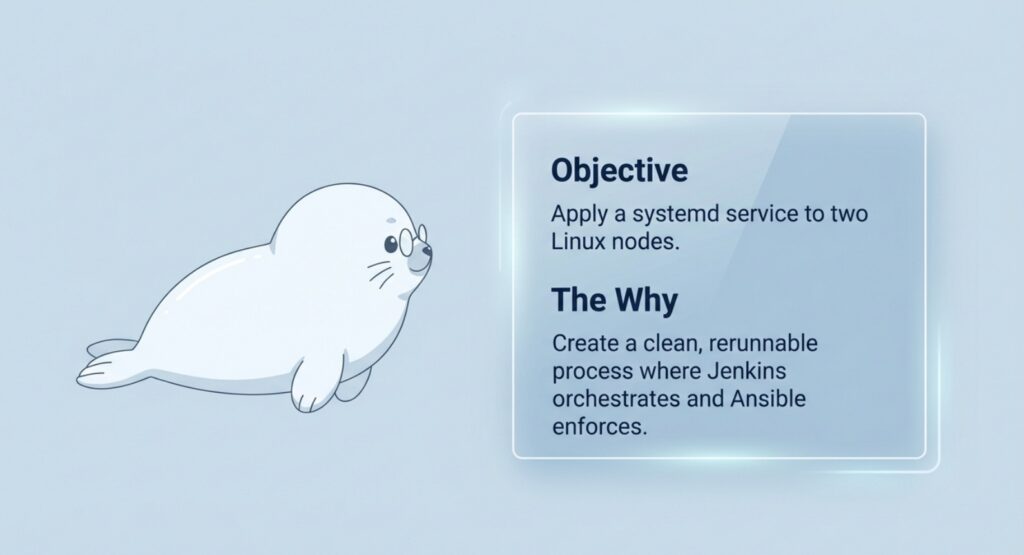
In this post, we’ll build a minimal Jenkins → Ansible → managed nodes pipeline that applies a small, visible change to two Linux nodes: a static landing page running as a systemd service. The goal isn’t the page—it’s the pattern. Jenkins orchestrates the run, Ansible enforces the desired state, and the pipeline stays clean and rerunnable.
At a high level:
- Jenkins triggers the job and connects to the Ansible control node.
- The control node runs
ansible-playbookagainst node01 and node02. - Each node converges to the same target state (files + systemd service).
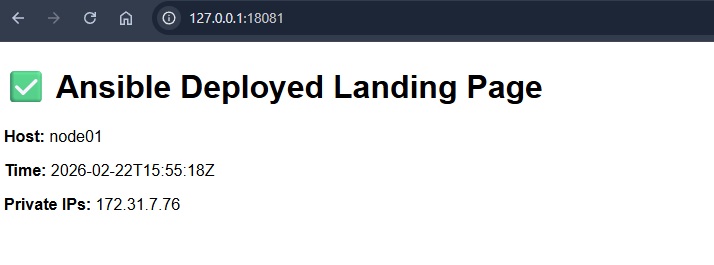
- We verify the result in a browser (via port-forwarded localhost URLs).
Features you’ll see
- Jenkins orchestrates; Ansible runs on the control node (Jenkins does not need Ansible installed).
- Runtime playbook generation + cleanup (self-contained demo with no leftover files).
- Fail-fast preflight checks with
test -f(stop immediately if inventory/SSH key files are missing). - Service lifecycle managed by Ansible (systemd):
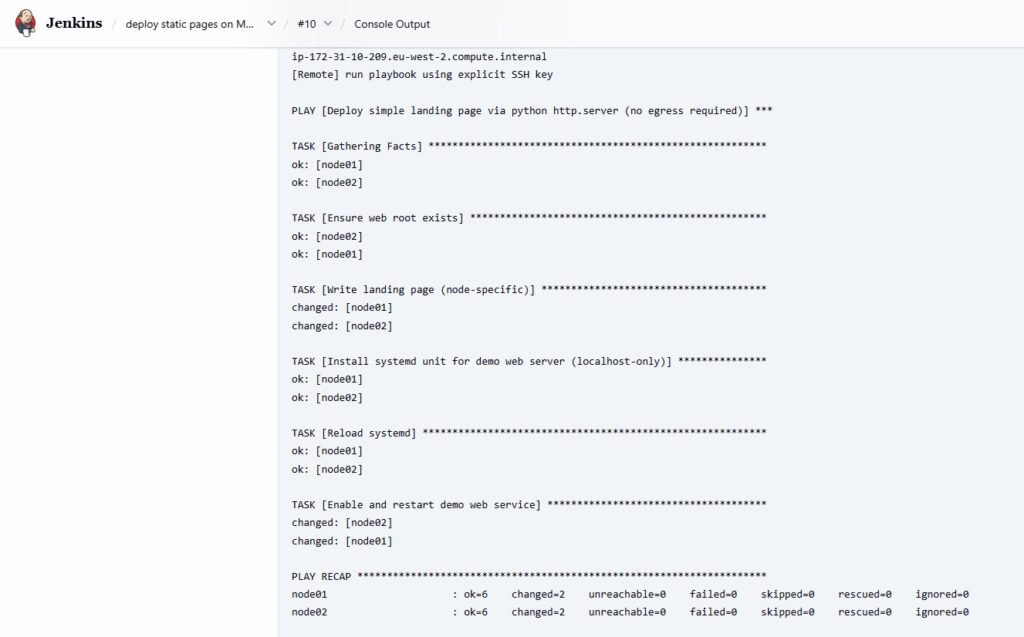
daemon-reload → enable → restart. - Instant visual verification via
python3 -m http.serverserving the landing page. - Safe targeting preview using
ansible ... --list-hostsbefore applying changes.
Topology
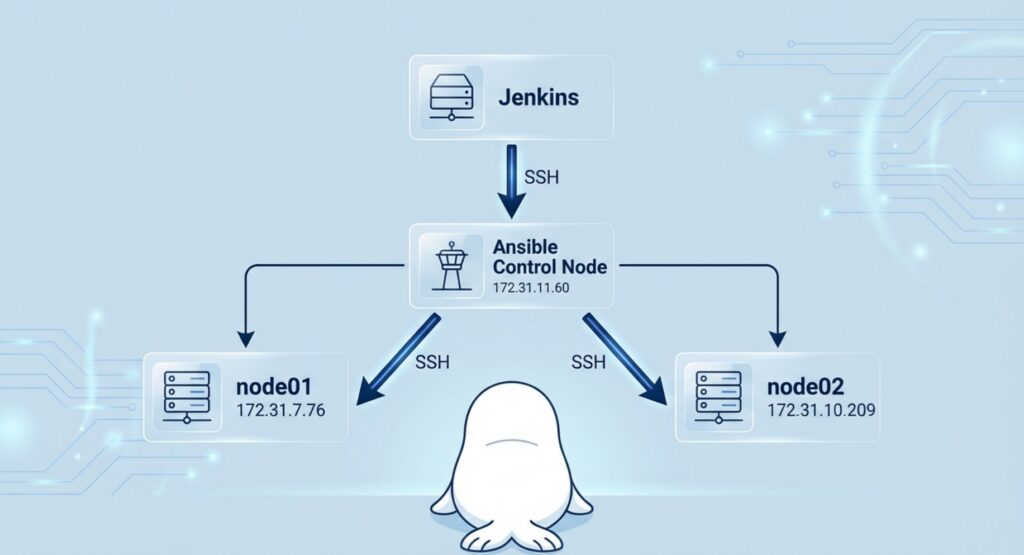
Jenkins ── SSH ──> Ansible(172.31.11.60)
                     ├─ SSH ──> node01 (172.31.7.76)
                     └─ SSH ──> node02 (172.31.10.209)
Demonstration
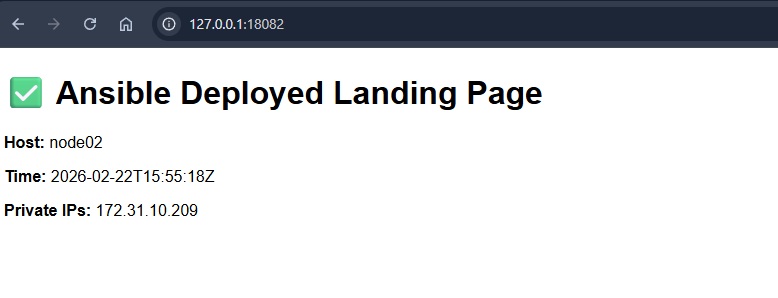
Pipeline overview
What Jenkins does
- Accepts parameters (control node IP, target group/nodes).
- Generates a small Ansible playbook on the fly (the “change” to apply).
- Uploads the playbook to the Ansible control node and triggers execution remotely.
- Captures logs and reports success/failure.
What the Ansible control node does
- Runs
ansible-playbookusing the known inventory (~/inventory.ini). - Connects to
node01andnode02over SSH and applies idempotent tasks:- ensure web root exists
- write
index.html - install/update a systemd unit
daemon-reload, enable, restart the service
Code Walkthrough: Create playbook
          # 1) Create a temporary playbook locally in workspace
          PLAYBOOK_LOCAL="site-$$.yml"
          cat > "$PLAYBOOK_LOCAL" <<'EOF'
Create a temp playbook file
PLAYBOOK_LOCAL="site-$$.yml"makes a unique filename per build.
Write the playbook into that file
cat > "$PLAYBOOK_LOCAL" <<'EOF' ... EOFsaves the YAML exactly as-is.
- name: Deploy simple landing page via python http.server (no egress required)
  hosts: managed
  become: true
  vars:
    web_root: /opt/demo-web
    web_port: 8080

  tasks:
    - name: Ensure web root exists
      file:
        path: "{{ web_root }}"
        state: directory
        mode: "0755"
Deploy play: target + vars
hosts: managedruns the play on every host in the managed group (e.g.,node01,node02).become: trueuses sudo, because later tasks write to system paths (like/etc/systemd/system).web_root: /opt/demo-websets the folder where the site files will live.web_port: 8080sets the port the Python web server will listen on.
Ensure web root exists
mode: "0755"makes the directory readable/executable for everyone, writable by root.- This task is idempotent: reruns won’t change anything if the folder is already correct.
    - name: Write landing page (node-specific)
      copy:
        dest: "{{ web_root }}/index.html"
        mode: "0644"
        content: |
          <!doctype html>
          <html>
          <head><meta charset="utf-8"><title>Demo Landing</title></head>
          <body style="font-family: sans-serif;">
            <h1>✅ Ansible Deployed Landing Page</h1>
            <p><b>Host:</b> {{ inventory_hostname }}</p>
            <p><b>Time:</b> {{ ansible_date_time.iso8601 }}</p>
            <p><b>Private IPs:</b> {{ ansible_all_ipv4_addresses | join(", ") }}</p>
          </body>
          </html>
Create a node-specific landing page
copy: dest={{ web_root }}/index.htmlwrites the HTML file into the web root so the web server can serve it at/.mode: "0644"makes the page readable by everyone (owner can write), which is ideal for a static file.content: | ...embeds the full HTML file directly in the playbook
    - name: Install systemd unit for demo web server (localhost-only)
      copy:
        dest: /etc/systemd/system/demo-web.service
        mode: "0644"
        content: |
          [Unit]
          Description=Demo Python Web Server (localhost only)
          After=network.target

          [Service]
          Type=simple
          WorkingDirectory={{ web_root }}
          ExecStart=/usr/bin/python3 -m http.server {{ web_port }} --bind 127.0.0.1
          Restart=on-failure

          [Install]
          WantedBy=multi-user.target
Install a systemd service for the Python web server
- This task drops a systemd unit file at
/etc/systemd/system/demo-web.service, so the Python web server can be managed like a normal Linux service. WorkingDirectory={{ web_root }}serves files from the defined working directory (so/opt/demo-web/index.htmlbecomes the homepage).ExecStart=/usr/bin/python3 -m http.server {{ web_port }} --bind 127.0.0.1starts the built-in Python HTTP server on port8080, bound to localhost only.Restart=on-failureautomatically restarts the service if it crashes.
    - name: Reload systemd
      systemd:
        daemon_reload: true

    - name: Enable and restart demo web service
      systemd:
        name: demo-web.service
        enabled: true
        state: restarted
Reload systemd, then enable + restart the service
- Reload systemd (
daemon_reload: true)- After creating or updating
/etc/systemd/system/demo-web.service, systemd needs to re-read unit files. This is the Ansible equivalent of runningsystemctl daemon-reload.
- After creating or updating
- Enable + restart (
enabled: true,state: restarted)enabled: truemakes the service start automatically on boot (systemctl enable demo-web).state: restartedensures the service is running now and immediately picks up the latest unit/page changes (systemctl restart demo-web).
Code Walkthrough: Upload, execute, and clean up the playbook on Ansible
          # 2) Upload playbook to control node (in /tmp)
          PLAYBOOK_REMOTE="/tmp/${PLAYBOOK_LOCAL}"
          scp -i "$SSH_KEY" $SSH_OPTS "$PLAYBOOK_LOCAL" "${ANSIBLE_USER}@${ANSIBLE_CONTROL_IP}:${PLAYBOOK_REMOTE}"
Upload the playbook to the control node
PLAYBOOK_REMOTE="/tmp/${PLAYBOOK_LOCAL}"places it under/tmpso it’s treated as a temporary file (easy to clean up).scp -i "$SSH_KEY" ...uses the Jenkins-side SSH key to authenticate to the control node and upload the file before execution.
          # 3) Run on control node + always cleanup remote playbook
          ssh -i "$SSH_KEY" $SSH_OPTS "${ANSIBLE_USER}@${ANSIBLE_CONTROL_IP}" "
            set -euo pipefail
            trap 'rm -f ${PLAYBOOK_REMOTE} || true' EXIT

            # Preflight on control node
            test -f ~/inventory.ini || { echo '[Remote][ERROR] missing ~/inventory.ini'; exit 2; }
            test -f ~/.ssh/ansible-managed-nodes || { echo '[Remote][ERROR] missing ~/.ssh/ansible-managed-nodes'; exit 3; }
            chmod 600 ~/.ssh/ansible-managed-nodes || true

            echo '[Remote] list hosts (group: managed)'
            ansible -i ~/inventory.ini managed --list-hosts

            echo '[Remote] key fingerprint'
            ssh-keygen -lf ~/.ssh/ansible-managed-nodes || true

            echo '[Remote] direct SSH test to node01/node02 using the same key (non-fatal)'
            ssh -i ~/.ssh/ansible-managed-nodes -o StrictHostKeyChecking=accept-new ec2-user@172.31.7.76  'whoami && hostname' || true
            ssh -i ~/.ssh/ansible-managed-nodes -o StrictHostKeyChecking=accept-new ec2-user@172.31.10.209 'whoami && hostname' || true

            echo '[Remote] run playbook using explicit SSH key'
            ansible-playbook -i ~/inventory.ini ${PLAYBOOK_REMOTE} --limit managed \
              -e ansible_ssh_private_key_file=~/.ssh/ansible-managed-nodes
          "
[Important!] Run playbook remotely to create pages on managed nodes
- Jenkins SSHes into the Ansible control node and runs everything there (so Jenkins doesn’t need Ansible installed).
- Preflight checks:
test -f ~/inventory.iniconfirms the inventory exists.test -f ~/.ssh/ansible-managed-nodesconfirms the SSH key exists and fixes permissions (chmod 600).
ansible -i ... --list-hostsprints which nodes will be affected before making changes.- direct
ssh ... whoami && hostnameconfirms SSH to both nodes works. ansible-playbook ... --limit managedapplies the change to the managed group, explicitly using the intended SSH key.
          # 4) Cleanup local temp file
          rm -f "$PLAYBOOK_LOCAL"
Clean up the local temporary file
- After the playbook is uploaded and executed, the pipeline deletes the temporary playbook file from the Jenkins workspace:
rm -f "$PLAYBOOK_LOCAL"removes it quietly (no error if it’s already gone).
Jenkins file
Note: The Jenkins file below uses masked/demo placeholders (generic SSH key path). Replace TARGET_IP, the SSH key/credentials, and mail recipients with your own values.
pipeline {
  agent any

  environment {
    // Jenkins host local SSH key to reach the Ansible control node
    SSH_KEY = '====PLEASE UPDATE TO YOUR SSH PRIVATE KEY PATH VALUE===='

    // known_hosts management
    SSH_DIR = '====PLEASE UPDATE TO YOUR SSH DIRECTORY PATH VALUE===='
    SSH_KNOWN_HOSTS = '====PLEASE UPDATE TO YOUR SSH KNOWN_HOSTS PATH VALUE===='

    // Strict host key checking; we'll populate known_hosts via ssh-keyscan
    SSH_OPTS = "-o StrictHostKeyChecking=yes -o UserKnownHostsFile=${SSH_KNOWN_HOSTS} -o ConnectTimeout=10"
  }

  parameters {
    string(
      name: 'ANSIBLE_CONTROL_IP',
      defaultValue: '172.31.11.60',
      description: 'Ansible control node private IP'
    )

    string(
      name: 'ANSIBLE_USER',
      defaultValue: 'ec2-user',
      description: 'SSH username on the Ansible control node'
    )

    string(
      name: 'TARGET_IPS',
      defaultValue: '172.31.7.76,172.31.10.209',
      description: 'Comma-separated managed node IPs (kept for demo logging; execution uses managed group)'
    )
  }

  stages {

    stage('Preflight: Jenkins SSH key exists') {
      steps {
        sh '''
          set -euo pipefail
          test -f "$SSH_KEY" || { echo "ERROR: SSH key not found at $SSH_KEY"; exit 1; }
          chmod 600 "$SSH_KEY" || true
          ls -l "$SSH_KEY"
        '''
      }
    }

    stage('Prepare known_hosts (Ansible control)') {
      steps {
        sh '''
          set -euo pipefail
          mkdir -p "$SSH_DIR"

          touch "$SSH_KNOWN_HOSTS" || true
          chown jenkins:jenkins "$SSH_KNOWN_HOSTS" || true
          chmod 600 "$SSH_KNOWN_HOSTS" || true

          grep -qE "^${ANSIBLE_CONTROL_IP}[ ,]" "$SSH_KNOWN_HOSTS" 2>/dev/null || {
            echo "[INFO] Adding ${ANSIBLE_CONTROL_IP} to known_hosts"
            ssh-keyscan -H "${ANSIBLE_CONTROL_IP}" >> "$SSH_KNOWN_HOSTS"
          }
        '''
      }
    }

    stage('Check SSH to Ansible control') {
      steps {
        sh '''
          set -euo pipefail
          ssh -i "$SSH_KEY" $SSH_OPTS "${ANSIBLE_USER}@${ANSIBLE_CONTROL_IP}" \
            'whoami && hostname && ansible --version | head -n 1'
        '''
      }
    }

    stage('Deploy landing page (create/play/cleanup)') {
      steps {
        sh '''
          set -euo pipefail

          # Demo parameter; trimming spaces for clean logging
          LIMIT="$(echo "${TARGET_IPS}" | tr -d '[:space:]')"
          echo "TARGET_IPS=${LIMIT}"
          echo "NOTE: Execution uses Ansible group 'managed' (inventory hostnames are node01/node02)."

          # 1) Create a temporary playbook locally in workspace
          PLAYBOOK_LOCAL="site-$$.yml"
          cat > "$PLAYBOOK_LOCAL" <<'EOF'
- name: Deploy simple landing page via python http.server (no egress required)
  hosts: managed
  become: true
  vars:
    web_root: /opt/demo-web
    web_port: 8080

  tasks:
    - name: Ensure web root exists
      file:
        path: "{{ web_root }}"
        state: directory
        mode: "0755"

    - name: Write landing page (node-specific)
      copy:
        dest: "{{ web_root }}/index.html"
        mode: "0644"
        content: |
          <!doctype html>
          <html>
          <head><meta charset="utf-8"><title>Demo Landing</title></head>
          <body style="font-family: sans-serif;">
            <h1>✅ Ansible Deployed Landing Page</h1>
            <p><b>Host:</b> {{ inventory_hostname }}</p>
            <p><b>Time:</b> {{ ansible_date_time.iso8601 }}</p>
            <p><b>Private IPs:</b> {{ ansible_all_ipv4_addresses | join(", ") }}</p>
          </body>
          </html>

    - name: Install systemd unit for demo web server (localhost-only)
      copy:
        dest: /etc/systemd/system/demo-web.service
        mode: "0644"
        content: |
          [Unit]
          Description=Demo Python Web Server (localhost only)
          After=network.target

          [Service]
          Type=simple
          WorkingDirectory={{ web_root }}
          ExecStart=/usr/bin/python3 -m http.server {{ web_port }} --bind 127.0.0.1
          Restart=on-failure

          [Install]
          WantedBy=multi-user.target

    - name: Reload systemd
      systemd:
        daemon_reload: true

    - name: Enable and restart demo web service
      systemd:
        name: demo-web.service
        enabled: true
        state: restarted
EOF

          # 2) Upload playbook to control node (in /tmp)
          PLAYBOOK_REMOTE="/tmp/${PLAYBOOK_LOCAL}"
          scp -i "$SSH_KEY" $SSH_OPTS "$PLAYBOOK_LOCAL" "${ANSIBLE_USER}@${ANSIBLE_CONTROL_IP}:${PLAYBOOK_REMOTE}"

          # 3) Run on control node + always cleanup remote playbook
          ssh -i "$SSH_KEY" $SSH_OPTS "${ANSIBLE_USER}@${ANSIBLE_CONTROL_IP}" "
            set -euo pipefail
            trap 'rm -f ${PLAYBOOK_REMOTE} || true' EXIT

            # Preflight on control node
            test -f ~/inventory.ini || { echo '[Remote][ERROR] missing ~/inventory.ini'; exit 2; }
            test -f ~/.ssh/ansible-managed-nodes || { echo '[Remote][ERROR] missing ~/.ssh/ansible-managed-nodes'; exit 3; }
            chmod 600 ~/.ssh/ansible-managed-nodes || true

            echo '[Remote] list hosts (group: managed)'
            ansible -i ~/inventory.ini managed --list-hosts

            echo '[Remote] key fingerprint: ====REDACTED===='

            echo '[Remote] direct SSH test to node01/node02 using the same key (non-fatal)'
            ssh -i ~/.ssh/ansible-managed-nodes -o StrictHostKeyChecking=accept-new ec2-user@172.31.7.76  'whoami && hostname' || true
            ssh -i ~/.ssh/ansible-managed-nodes -o StrictHostKeyChecking=accept-new ec2-user@172.31.10.209 'whoami && hostname' || true

            echo '[Remote] run playbook using explicit SSH key'
            ansible-playbook -i ~/inventory.ini ${PLAYBOOK_REMOTE} --limit managed \
              -e ansible_ssh_private_key_file=~/.ssh/ansible-managed-nodes
          "

          # 4) Cleanup local temp file
          rm -f "$PLAYBOOK_LOCAL"
        '''
      }
    }
  }

  post {
    always {
      // Extra safety: wipe any leftovers in workspace
      sh 'rm -f site-*.yml || true'
    }
  }
}
Summary
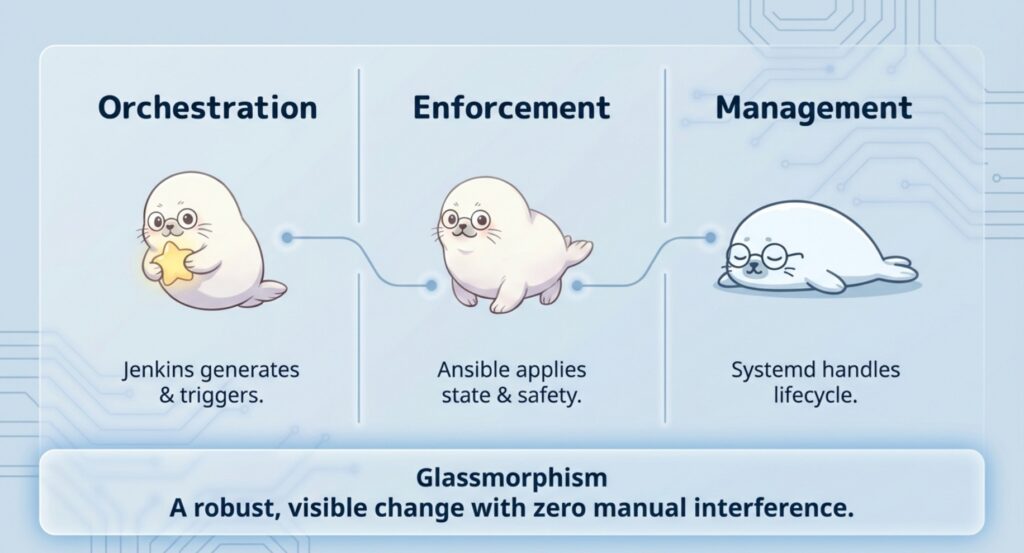
In this demo, we built a minimal Jenkins → Ansible → managed nodes pipeline that applies a real change to multiple nodes in a repeatable way. Jenkins orchestrates the run, the Ansible control node executes ansible-playbook, and the nodes converge to the same desired state (static page + systemd service). The result is easy to verify, safe to rerun, and simple to extend—swap the “landing page” for any operational change you want to automate.


Comments